Sunday, 22 June 2014

Did I mention that FPGA development is frustrating?

Now that the C65GS is getting to a more usable point, I thought it would be nice to burn the latest working FPGA image into the flash ROM on the Nexys4 board that is supplied for exactly that purpose.

I have tried a variety of things all afternoon to no avail.

It turns out I am not the only one having this problem:

http://www.mikrocontroller.net/topic/327257#3698806

Unfortunately no solution posted there.

Then I stumbled across this little gem of a forum post:

http://forums.xilinx.com/xlnx/board/crawl_message?board.id=NewUser&message.id=6124

Quoting from the poster:

"Here is what I am told in a tech support email from Digilent: 1. Nexys4 cannot be programmed with current version of Vivado. We hope problems will be resolved in the next version. Read more on http://www.xilinx.com/support/answers/57385.htm 2. Adept is not able to program Nexys4. And it won’t be. 3. Use iMPACT for programming. They couldn't be bothered to put this very relevant information into their user manual."

Yay.  This would have been really handy to know.  
To add to the intrigue and frustration, the URL they point to redirects somewhere useless now, so the answer isn't even directly accessible.

Digilent have updated the user guide for the Nexys4 since I got my board, but there is no collated errata section for me to work out what has changed, and reading every word to compare two 28 page documents isn't that thrilling a prospect.

The updated reference guide is here.

Now that I know what I am looking for, I can see that they have updated the relevant text on page 5 - 6 to now read:

"Quad-SPI programming can be done using the iMPACT tool included with ISE or the labtools version of Vivado."

This suggests that the latest version of Vivado should be okay, although I am at a loss to know what "labtools version" means.  I hope this doesn't mean it isn't in the free version.  Downloading Vivado isn't for the light hearted, however, as it is several GB just to download.  I will need to enlarge my Linux VM to even try.  Maybe I will just form my Linux VM off and reinstall.

Anyway, it suggests that I should be able to program the thing using iMPACT in ISE.  This would be great except that I run iMPACT from in a VM on my mac, and so it can't see the USB programming cable.  Some sort of dual-boot would be the other option here.  I do have ISE on an older Windows machine here, but haven't succeeded in getting that to program the thing either.

Anyway, currently frustrated with the process, but will keep prodding my way around to find a solution.

End of necessary venting of frustration.


Saturday, 21 June 2014

Another speed bump. Now close to 30x C64 speed

This evening I had a few minutes to implement the next IPC improvement I had in mind.  This one is just implementing the simple end of instruction pipeline for instructions where it is possible, the same as I have already done for single byte instructions, and the same as what the real 6502 has always done.

The result is a nice little speed up as the pictures show.


This is among the last of the speed ups that I will do before a substantial reimplementation of the CPU to make it table driven.  Using a table reduces the FPGA logic consumption a lot, and also has the potential to allow the CPU speed to be increased quite a bit, hopefully to 64MHz or even 96MHz all going well.  But it is really the logic reduction that matters, so that I have space to implement the missing features in the C65GS.

Friday, 20 June 2014

A speed improvement

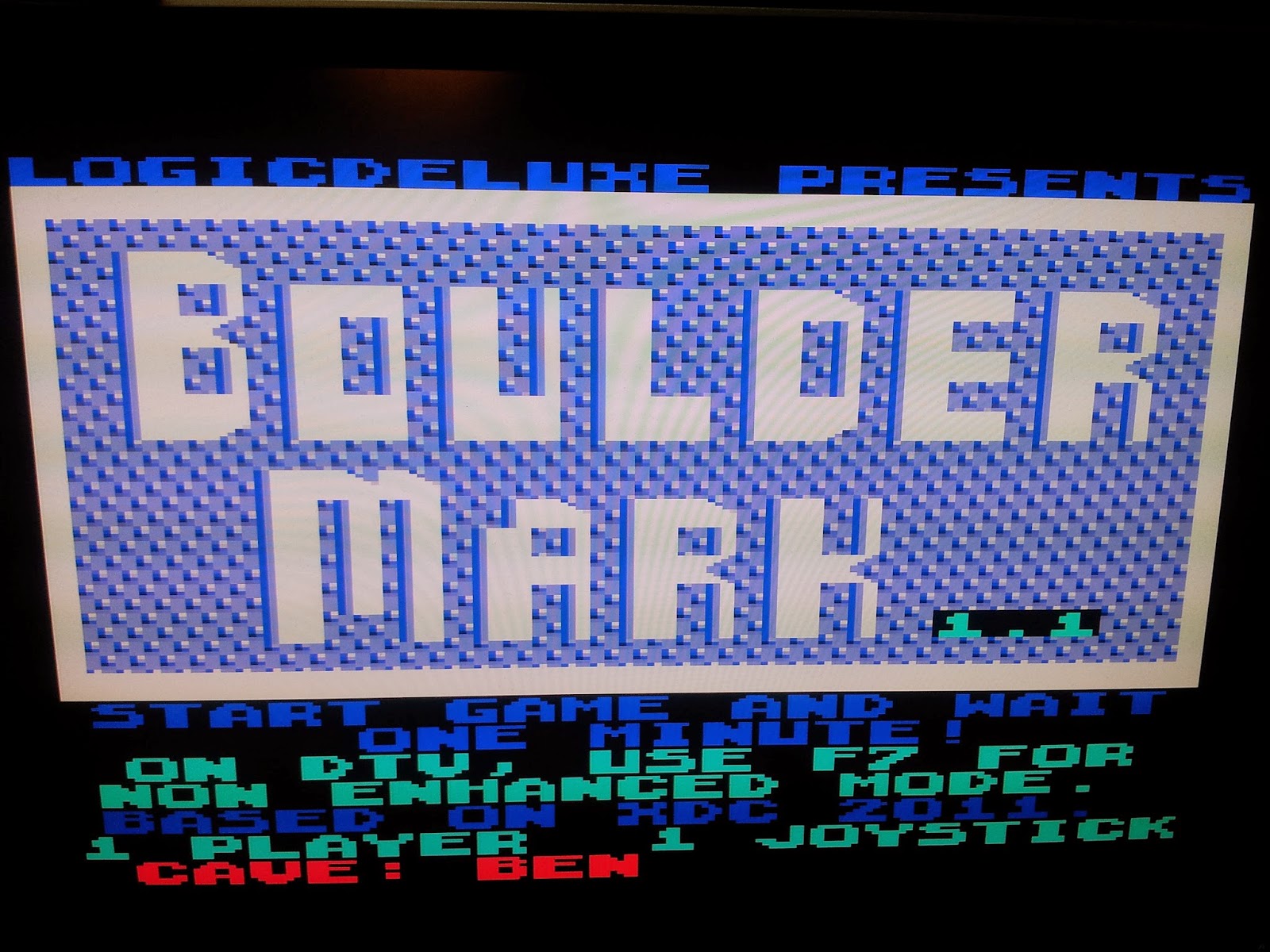
Reflecting on the recent benchmark results, and especially that the revision 9 Chameleon is almost exactly the same speed as the C65GS in the bouldermark benchmark, I wondered if there was any low-hanging fruit I could tackle to increase the speed of the C65GS.

The main slow-down with the C65GS is the wait-state on reading chipram.  I had tried various ways to supress the wait-state at its root cause in the FPGA dual-ported block RAM without luck.  Then it occurred to me this morning that I could make a single-port shadow RAM that shadows all of chipram.  So writing to chipram writes to both, and reads by the CPU would be sourced from the chipram -- with no wait-state.

So as a reminder of the state of affairs before todays improvements:


Removing the wait state on chipram by implementing the shadow RAM had quite a nice impact:


Functional calls are about 30% faster, and RAM operations in general are all moderately improved, as might be expected.  This also got bouldermark quite a bit faster.


In the process I realised what should have been obvious to me, that implied/accumulator mode single-byte instructions were still taking two cycles, and could be easily reduced to one cycle.  This makes NOPs run at an amazing 71x, and pushed the overall rating up a little to 26.9x:


BoulderMark now indicates just over 55x.  I am still at a loss why the machine is so much faster than a stock C64 for BoulderMark, but the same phenomena is visible with the latest version of the Chameleon that gets a rating of around 14,000 (see http://wiki.icomp.de/wiki/C64_Benchmarks).  That's a mystery that will have to remain for now.


In the meantime, I have a couple more ideas to improve performance that I will try.

Thursday, 19 June 2014

multi-colour bitmap and character modes now mostly working

Overnight I fixed a few bugs that were stopping multi-colour text and bitmap mode from working.

Colour selection is now working correctly as can be seen in the following images.  It is also clear that the machine is able to run increasingly complex software.

However as can be seen is some glitching going on in bitmap mode.  I need to look into the cause of this.  It looks like 3 physical pixels wide, which would suggests it might be a pixel pipeline issue.


Multi-colour text mode has been fixed as well, and has no bitmap related glitches.

Wednesday, 18 June 2014

Multi-colour text and graphics closer to working

Running bouldermark I realised that multicolour text and graphics modes had some major problems. 

So I revisited the VHDL code for them, found that multi-colour graphics was simply not implemented at all, and multi-colour text mode had some big fat bugs.

A bit of poking around and sorting things out has it much better, although far from perfect.  For example, some games seem to be largely working now:


And bouldermark, while still not perfect, has the right colours for the most part, although one of the multi-colour bit combinations is pulling the colour from the wrong place, as can be seen by the bricks being mostly invisible in the last image.  But it is progress nonetheless.


C65GS begins to run real software, sort of.

Over the last couple of days with the help of Max, I have identified and fixed some PLA/MMU bugs for C64 mode.  These bugs were stopping anything that touched $01 from working.  With those bugs fixed, the machine is now able to run some simple software.

Turbo assembler now works 100%, which makes it easier to write and run little programs for testing other hardware features.

Also, some games, like Lemmings and Wizball, are showing signs of running, but with various graphics problems.

Bouldermark is now able to run, too, although with somewhat garbled display.  So I was finally able to see how the machine compares to Chameleon and SCPU in that benchmark.  This is interesting to me, since I know that SynthMark64 is not that representative.

Here is a quick clip of it running.


Note that the raster splits are happening on the wrong rasters.  This is a problem common to all software on the C65GS right now because the display is 1248 pixels high, to be exactly 4x PAL.  But the default resolution is 5x pixels so that the top and bottom borders aren't huge.  This means that I need to make $D012 not count monotonically, so that it can advance faster in the top border, so that it can match the VIC-II raster numbers exactly once it reaches the main display.  Then in the bottom border it can speed up again so that all PAL raster lines exist.

 Back to the point, here is the result: 14,380.  This is only slightly ahead of the latest revision of the Chameleon64, despite the C65GS being about twice as fast when measured using SynthMark64. So the C65GS remains marginally the fastest C64 option, but of course the performance is still subject to change as I finish implementing the many missing features.


Tuesday, 17 June 2014

First words and a new skin

With Max the work experience student we pushed ahead today and got the C65GS living inside the case of a dead C64C, and added a few missing features, most notably $D418 now works for digital audio (still no SID voices for now).

I had previously tried using a Keyrah v2 with the C65GS, but the keyboard layout was completely bananas.  It turns out I must have mis-read the instructions, and had one of the jumpers wrong.  With that fixed, we were able to use the keyrah with the FPGA board.

From there it was fairly easy sailing to get the board sitting inside a C64 case, although there are cables coming out of all sorts of holes, and in some cases going back into other holes.  USB goes from the keyrah in the C64 power socket location to the FPGA's USB port to connect them together.  Actual power comes in via a USB cable in the cassette port.  Audio comes out via the RF hole using a 3.5mm audio jack.  micro-SD card is accessible via the cassette port.  VGA lead snakes out of the expansion port.  Clearly this will all need to be tidied up over time.

With all of that together, it was mostly working.  The Keyrah uses a different keyboard layout from my rather arbitrarily chosen one, so I needed to fix the usb keyboard decoder in the C65GS.  Getting a Mac or Linux box to actually tell me the right scan codes for each key proved tricky.  So instead I modified the FPGA config so that $D6F6 and $D6F7 contain the full 12-bit scan code for the last key pressed or released.  With that I was able to walk through each key and get the right scan codes.  I am now compiling those into the FPGA config.

But even with the slightly wonky keyboard layout in the meantime, it is possible to drive the machine to do simple things.  So we wrote a little program that plays some digital audio out through the newly implemented interface.  In the following video you can see the C65GS in its shell, including loading and playing the digital audio:


Because we are using the keyrah interface (for now), there is no convenient way to reset the machine.  So I am also rebuilding the FPGA config with logic that interprets a long press on RESTORE to cause a reset, similar to some other C64 mods and replacement main-boards that are available.  We will see how that works tomorrow, all going well.